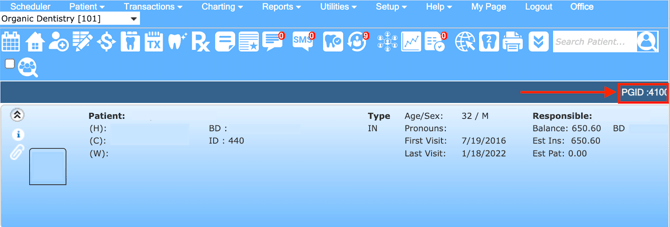
When setting up your Pearl integration, you'll need some information from your PlanetDDS (PDDS) account: the PDDS XVWeb URL (Imaging) and the PGID (Practice Group ID) (If you are a Denticon User). This guide walks through where to find both.
Finding your PDDS Web URL
What is the PDDS Web URL?
The PDDS Web URL (also referred to as the XVWeb URL) is the web address used to access your imaging system through a browser. The URL may look similar to this:
https://xvweb.apteryx.com/yourpractice
There are two ways to locate your Web URL depending on how your office is set up.
Option 1: Open Denticon Setup Settings
-
Log into Denticon
- Navigate to Setup > Account Info

- Click on Advanced and scroll down to the Third Party Settings section
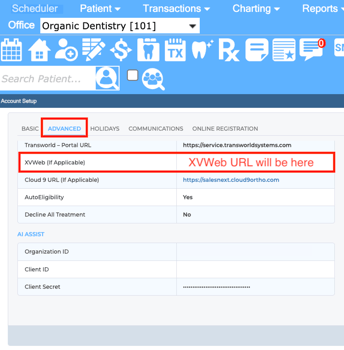
- You should see your XVWeb URL listed.
Option 2: Launch Apteryx from Denticon
- Open a patient record and navigate to their imaging/radiographs in Denticon. You should see the PGID located on the top right side.
- Click the "Launch Apteryx in New Window" button
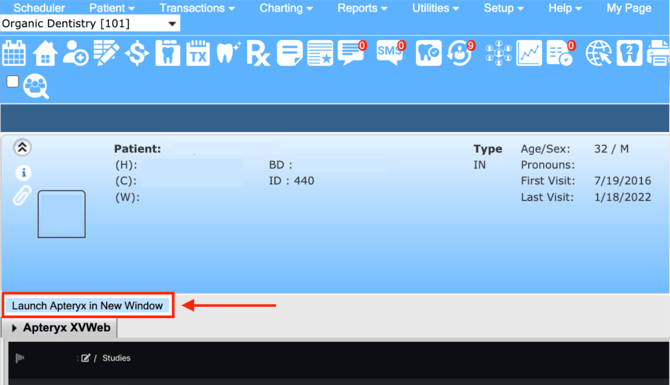
- XVWeb will open in a new browser window
- Copy the URL directly from your browser's address bar — that is your XVWeb URL
Not using Denticon as your practice management system? To find your XVWeb URL, simply copy the URL from the browser window you use to view radiographs.
Finding your PGID
What is the PGID?
If you are a Denticon user, you will have a PGID (Practice Group ID)—this is your organization's unique account number. This can be found in the upper right corner of your Denticon interface.